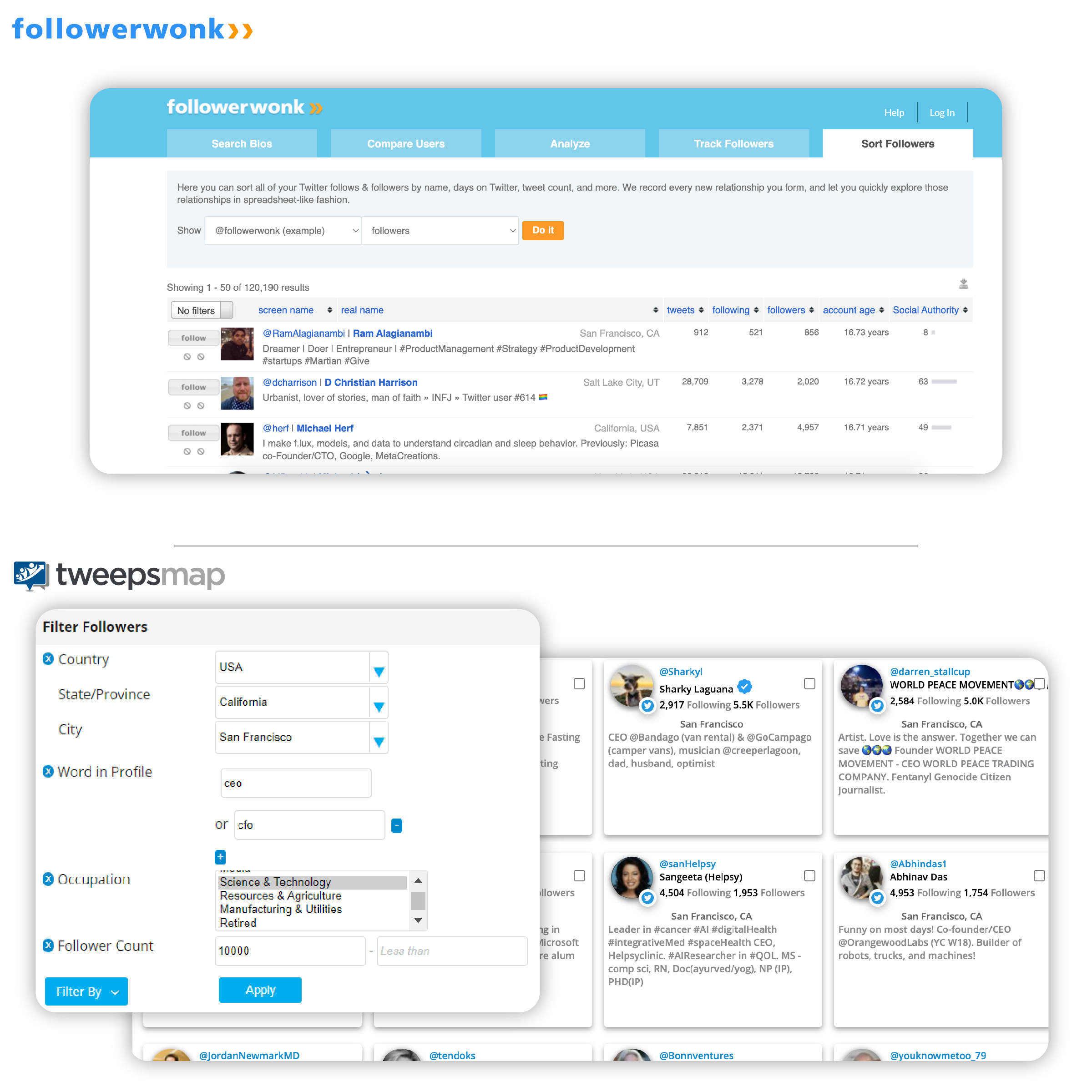
What You Can Do with Follower Sorting & Filtering
Segment your existing followers to identify real customers, understand your audience demographics, and prioritize engagement with the followers who matter most.
🔍 Search in Your Followers
Filter your Twitter/X and Bluesky followers by keywords in bio, location, verification status, age, occupation, gender, activity level, and follow-back status. Stack multiple filters for precision targeting.
✅ Identify Real Customers
Use audience quality checks to identify real customers vs. bots. Filter out default photos, empty bios, spam accounts, and extreme follow ratios to focus on authentic followers.
📊 Demographic Segmentation
Segment your followers by location, occupation, language, gender, and age. Analyze demographics to understand your audience and create targeted content by segment.
🎯 Topic-Based Filtering
Use keyword and hashtag analytics to find followers discussing specific topics. Filter by posts from keyword/hashtag reports to identify active participants in your niche.
🤝 Relationship Tracking
Filter by follow-back status, unfollowers, and relationship type. Track who you follow vs. who follows you, and identify mutual connections.
📈 Engagement Prioritization
Sort followers by engagement rate, influence score, activity level, and posting frequency. Prioritize engagement with your most active and influential followers.
📋 List-Based Filtering
Filter followers by lists they belong to. Use Search & Explore to find topic participants, add them to lists, then filter in Sort Followers by those lists.
🌍 Location & Language Targeting
Filter followers by specific locations, cities, or regions. Segment by language to create region-specific campaigns and content.
🚀 Export & Campaign Building
Export filtered and sorted follower lists to CSV or directly to X Ads platform. Build custom audiences for targeted campaigns based on your segmentation.
X's Basic Followers vs. Followerwonk Sorting & Filtering
| Feature | X (Twitter) | Followerwonk |
|---|---|---|
| Search Followers by Keywords in Bio | ✗ Not available | ✓ Search followers by word in profile |
| Demographic & Location Filters | ✗ Not available | ✓ Location, language, occupation, gender, age |
| Activity & Engagement Filtering | ✗ Not available | ✓ Activity level, engagement rate, influence sorting |
| Bot Detection & Quality Checks | ✗ Not available | ✓ Identify bots, default photos, spam accounts |
| Stack Multiple Filters | ✗ Not available | ✓ Apply and combine multiple filters simultaneously |
| Export Filtered Lists | ✗ Not available | ✓ Export to X Ads & CSV |
How It Works
1. Access Your Followers
Start with your Twitter/X or Bluesky followers. Use the Sort Followers tool to sort Twitter followers by searching within your existing follower base and filtering by keywords in bio, location, demographics, and more.
2. Apply Stacked Filters
Add multiple filters to narrow down your followers: location, keywords in bio, verification, age, occupation, gender, activity level, follow-back status, lists, and posts. Stack filters to create precise segments.
3. Sort & Review Results
View results in a visual grid with photos and bios. Sort by engagement rate, influence, following number, date created, follower count, or number of posts. Continue refining with additional filters.
4. Identify Real Customers & Export
Use quality checks to identify real customers vs. bots. Export filtered lists to CSV or directly to X Ads platform as custom audiences. Use segmentation insights to prioritize engagement and content.
Go Beyond Sorting Followers with Complete Followerwonk Tools
Access comprehensive social media management tools all in one platform.
Account Analysis
- Analyze any Twitter/X account's followers
- Demographics, languages, and time zones
- Influence distribution and engagement metrics
- Segment and sort followers by multiple criteria
Compare & Overlap
- Find common followers between accounts
- Compare multiple accounts side by side
- Analyze audience overlap and intersections
- Identify shared follower networks
Search & Explore
- Search for accounts by bio keywords
- Find topic participants and add to lists
- Filter discovered accounts in Sort Followers
- Build targeted lists for campaigns
Sorting Followers: Frequently Asked Questions
Can I sort Instagram followers by follower count?
No — and no tool can do this legitimately, including Followerwonk. Instagram's API provides no endpoint that returns your follower list. Business and Creator accounts can see aggregate audience insights, such as top countries and cities, age ranges, and when your audience is active, but Instagram never exposes the individual accounts that follow you. Without that list, there is nothing to sort.
Sorting followers by follower count works on X (Twitter) because the X API does return the follower list itself, with each account's own follower count attached. Instagram deliberately does not, and has not since the Instagram Basic Display API was retired.
Why do some tools claim they can sort Instagram followers?
Because they scrape the Instagram web interface rather than using the official API. That breaks Instagram's Terms of Use, and the account you connect is the one that carries the risk — rate limiting, action blocks, or permanent restriction. We do not do this, and we would not recommend a tool that does.
What can I actually learn about my Instagram audience?
Aggregate demographics rather than a sortable list: where your followers are, broad age and gender breakdowns, and activity patterns. Connect Instagram in Fedica for audience insights and publishing. Follower-level sorting and filtering — the features on this page — run on X and Twitter.
Which platforms can I sort followers on?
Sorting and filtering an individual follower list requires the platform to expose that list through its API. X (Twitter), Bluesky, Mastodon and Pixelfed do. Instagram and TikTok do not. Where a platform only publishes aggregate data, you can get demographics and maps but not a per-follower list you can filter, stack, and export.
Can I sort my own followers by follower count on X?
Yes. That is what this tool does. Sort your X and Twitter followers by their follower count, then stack filters on bio keywords, location, language, activity level, and engagement, and export the result to CSV or an X Ads audience.
Ready to Sort & Filter Your Followers?
Join thousands of social media managers and marketers using Followerwonk tools to segment their audiences, identify real customers, and prioritize engagement with the followers who matter most.